ShodhKosh: Journal of Visual and Performing ArtsISSN (Online): 2582-7472
|
|
Automated Editing Tools for Media Students: A Comparative Study
Dr. Ragini Kunal Jadhav 1 , Shalini E. 2
 , Mahesh
Kurulekar 3
, Mahesh
Kurulekar 3 , Pooja
Goel 4
, Pooja
Goel 4 , Urvashi
Bhat 5
, Urvashi
Bhat 5 , Dr.
Manisha Upadhyay 6
, Dr.
Manisha Upadhyay 6
1 Assistant
Professor, Prin. L. N. Welingkar Institute of Management Development and
Research, (PGDM), India
2 Assistant
Professor, Meenakshi College of Arts and Science, Meenakshi Academy of Higher
Education and Research, Chennai, Tamil Nadu, India
3 Assistant Professor, Department of Civil Engineering Vishwakarma
Institute of Technology, Pune, Maharashtra, India
4 Associate Professor, School of Business Management, Noida
International University, Greater Noida, India
5 Department of E and TC Engineering, Bharati Vidyapeeth's College of
Engineering, Lavale, Pune, Maharashtra, India
6 Assistant Professor, Department of Journalism and Mass Communication,
Mangalayatan University, Aligarh, India
|
|
|
ABSTRACT |
|
|
Purpose: To assess automated editing tools applied in the media education on the basis of technical and pedagogical terms. Methodology: Four categories of automated editing tools were evaluated based on a multi-dimensional model based on the level of automation, usability, creative control, pedagogical compatibility, and workflow efficiency. A student case study based on tasks was added to quantitative scoring. Results: The results show that high automation is more efficient and accessible, yet less creative transparency and conceptual comprehension. Equipment with balanced automation has better learning results. Implications: The study suggest that an automated editing tool should be integrated in the media education stages on the basis of a blended approach, depending on the stage. Originality: The article offers a comparative educational theory of evaluating
AI-assisted editing tools. |
|||
|
Received 08 September 2025 Accepted 04 December 2025 Published 17 February 2026 Corresponding Author Dr.
Ragini Kunal Jadhav, raginidevare@gmail.com DOI 10.29121/shodhkosh.v7.i1s.2026.7075 Funding: This research
received no specific grant from any funding agency in the public, commercial,
or not-for-profit sectors. Copyright: © 2026 The
Author(s). This work is licensed under a Creative Commons
Attribution 4.0 International License. With the
license CC-BY, authors retain the copyright, allowing anyone to download,
reuse, re-print, modify, distribute, and/or copy their contribution. The work
must be properly attributed to its author.
|
|||
|
Keywords: Automated Editing, Media Education, AI-Assisted
Creativity, Human–AI Collaboration, Creative Automation |
|||



1. INTRODUCTION
The speed of media production going digital has radically changed the process of producing and editing visual and audio material and distributing it. Conventionally, media editing was time-consuming and involved a lot of manual addition, technical knowledge, and long-term learning on professional software settings. Nevertheless, with the recent incorporation of artificial intelligence (AI) and machine learning (ML) into creative software, automated editing tools now exist that considerably lower the technical barriers, as well as the speed of production processes Zhai et al. (2024). Among media students (who must often juggle between conceptual creativity and the acquisition of technical expertise) these tools constitute both the opportunity and the pedagogical challenge. Computer vision, natural language processing, audio signal processing, and deep learning are some of the AI-based methods used to solve tasks that were previously done by humans through automated editing tools Licht et al. (2024). These operations are scene detection, color grading, audio enhancement, subtitle generation, motion tracking and content summarization. Such pop culture tools as Adobe premier Pro (with its Sensei AI), DaVinci Resolve, Runway ML, Descript, and Capcut have introduced automation into regular editing programs, meaning advanced post production is now available to users with minimal expertise Alier et al. (2024). Consequently, media education is undergoing a transformation in terms of tool-based learning towards concept-based learning and workflow-based learning Almassaad et al. (2024).
Figure 1

Figure 1 Basic Block Schematic of AI based Video Editing
Process
Educationally, automated editing tools have a number of advantages. They allow students to pay more attention to storytelling, narrative structure, pacing, and aesthetic decisions instead of spending too long working on mechanical operations as represented in Figure 1 The fact that automation makes prototyping fast also enables rapid and creative iteration, with the visual feedback given to the learner in real-time Deng et al. (2024). This is in line with the modern constructivist learning theories, in which practical activity and trial-by-error are the key elements of learning a skill. Moreover, automation helps to encourage inclusivity by reducing the barriers to entry of students with low technical skills or physical issues Gouseti et al. (2024).
The purpose of this research paper is to perform a comparative analysis of major automated editing programs as applied in media education and assess them according to their level of automation, usability, learning, creative control, and pedagogical alignment. The synthesis of the technical abilities and knowledge obtained through the learning process is aimed at helping educators, curriculum developers, and students use the right tools to facilitate learning without damaging the creative integrity Al‑Zahrani et al. (2024). Finally, the paper will contribute to the changing discussion about AI-enhanced creativity and how it can be employed to define the future of media studies.
2. Background and Evolution of Automated Media Editing Tools
The development of media editing technologies can be seen as an upward shift in the manual and technically intensive processes to intelligent and automation-based creative systems. Initial digital editing systems were mainly non-linear versions of analog editing (which provided non-linear timelines and manual control of audiovisual elements) and were largely similar to analog editing O'Connor et al. (2022). As much as these systems gave professional creators more power they were also very demanding on the cognitive and technical abilities of people requiring to use them especially students in media and communication studies. According to Table 1 above, the initial stage of digital editing focused more on the use of software than the use of ideas to tell a story and this usually constrained creative experimentation among learners Chinta et al. (2024). There was a major change as machine learning and computer vision technologies were introduced into the professional editing space. This transformation was also increased by the introduction of AI-native editing platforms. In contrast to the traditional software that became automated over time, the AI-native tools were developed based on the principles of automation. This period, as shown in Table 1, has many high-levels of automation and high education relevancy allowing students to learn to concentrate in narrative structure, pacing and conceptual development and not procedural execution.
Table 1
|
Table 1 Evolution of Media Editing Tools and Automation Capabilities |
||||
|
Era |
Representative Tools |
Dominant Technologies |
Level of Automation |
Educational
Implications |
|
Early Digital Editing
(1990s–2000s) |
Adobe Premiere Pro
(early versions), Final Cut Pro Almulla et al. (2023) |
Manual non-linear
editing, timeline-based interfaces |
Very Low |
Strong technical skill
development; steep learning curve for students |
|
Assisted Digital
Editing (2005–2015) |
Adobe Premiere
(presets), Avid Media Composer Tiernan et al. (2023) |
Rule-based automation,
templates, presets |
Low–Moderate |
Improved efficiency;
still tool-centric pedagogy |
|
Intelligent Editing
Systems (2016–2020) |
DaVinci Resolve Munro et al.
(2023) |
Computer vision,
ML-based color grading, facial recognition |
Moderate |
Shift toward creative
decision-making and visual aesthetics |
|
AI-Native Editing
Platforms (2020–Present) |
Runway ML, Descript Brako et al. (2023) |
Deep learning, NLP,
multimodal AI, generative models |
High |
Rapid prototyping,
accessibility for beginners, focus on storytelling |
|
Mobile & Cloud
Automation Era (2022–Present) |
CapCut, Canva Susanti et al. (2023) |
Cloud AI, template
intelligence, real-time automation |
Very High |
Democratized editing;
raises concerns on skill depth and originality |
In more recent times, mobile, and cloud-based editing system brought automation to a larger group of learners. CapCut and Canva are programs designed to provide almost instant editing output through the use of AI real-time assistance, templates, and cloud computation Matsiola et al. (2022). Although such platforms make the media creation more democratic, and facilitate access to it, they also create pedagogical issues of originality, the depth of skills, and excessive dependence on ready-made templates.
3. Categories of Automated Editing Tools
The modern media education automated editing tools can be categorized based on the extent to which they are automated, the extent to which they require human input and the level of pedagogical interest. In contrast to conventional editing software in which the main role falls on the manual control, the automated software redistributes the creative and technical tasks to users and to intelligent systems O'Connor et al. (2022). This kind of categorization is necessary to the comparative analysis because it helps differentiate between the tools that only facilitate editing and those that, on the contrary, affect the creative results. Thus, it is possible to classify automated editing tools into four categories: assistive automation tools, intelligent enhancement tools, AI-native automation platforms, and template-driven cloud-based tools Desai and Kulkarni (2022). Assistive automation systems integrate automation into more traditional editing processes in a way that does not change creative control. Auto-align, stabilization, and preset corrections are some of the features that facilitate manual editing activities, such as in Adobe Premiere Pro and Avid Media Composer. They are specifically appropriate in the basic media education, as they expose the students to industry-standard settings and minimize the mechanical load.
Table 2
|
Table 2 Classification of Automated Editing Tools in Media Education |
||||
|
Category |
Representative Tools |
Core Technologies |
Automation Role |
Educational
Suitability |
|
Assistive Automation
Tools Chaudhry et al. (2022) |
Adobe Premiere Pro,
Avid Media Composer |
Rule-based logic,
basic ML |
Supports manual
workflows |
Strong for
foundational and industry training |
|
Intelligent
Enhancement Tools Williamson et al. (2020) |
DaVinci Resolve |
Computer vision, ML |
Enhances aesthetics
selectively |
Supports visual
literacy and quality benchmarking |
|
AI-Native Automation
Platforms Luan et al. (2020) |
Runway ML, Descript |
Deep learning, NLP,
multimodal AI |
Drives editing
decisions |
Enables rapid
prototyping and conceptual learning |
|
Template-Driven Cloud
Tools |
CapCut, Canva |
Cloud AI, template
intelligence |
Automates structure
and style |
Useful for beginners;
limited creative depth |
Semantic, text-based and generative editing Runway ML and Descript tools allow semantic, text-based, and generative editing workflows with the help of deep learning and natural language processing. Cloud based tools based on templates put more emphasis on accessibility and speed by use of predefined layouts and automated processing. Content creation applications like CapCut and Canva are easy to use and may reduce the originality because of the dependency on templates. Their learning value is mainly in introductory learning scenarios and should be well framed to guarantee significant creative interaction.
4. Comparative Evaluation Framework
A framework of systematic and open comparison of automated editing tools is necessary in the context of media education, since they are not only technologically advanced but also in pedagogical terms. Compared to comparisons that are purely industry-oriented, where the central focus is considered to be efficiency or output quality, an educational evaluation framework should consider learning outcomes, creative agency, usability, and skill development. This paper also assumes a multi-dimensional comparative paradigm that is based on a combination of technical performance indicators with educational appropriateness indicators, which allow the balanced evaluation of media student automated editing tools.
E=i=1∑5wi×Si
The suggested framework analyzes tools on five major dimensions including level of automation, usability and learning curve, creative control and transparency, pedagogical alignment, and workflow efficiency. These dimensions have been chosen with references to the curricula of the media education, in which the students are supposed to achieve both conceptual and practical competence. All the dimensions are conceptualized using quantifiable standards so that the qualitative observations can be turned into quantifiable comparative ratings.
i=1∑5wi=1
The level of automation dimension evaluates how much a tool is involved in the editing process like cutting, enhancement, synchronization and reorganization of contents that it does by itself without human involvement. The scores are high in automation, meaning more decision-making is there to rely on AI, and low scores indicate the presence of manual or supportive workflows. Even though the high level of automation might increase the speed of production and lessen the cognitive load, it can also hide the underlying criteria of the editing. Thus, automation is not considered an absolute benefit but as a situational characteristic whereby the educational worth will be determined by the design of instructions.
Figure 2

Figure 2 Multi-Dimensional Comparative Evaluation Framework for Automated Editing Tools in Media Education, Integrating Technical, Creative, And Pedagogical Criteria
The dimension of usability and learning curve will include the simplicity with which learners will be able to adapt and use an instrument. They are interface intuitiveness, onboarding, tutoring accessibility, and technical pre-knowledge level. Simplified interfaces and guided workflows are rated higher on usability especially on beginner-level media course as shown in Figure 2 But over simplification can act as a constraint to exposure to professional editing paradigms, which is taken into account when analysing results. The creative control and transparency dimension measures how students are able to comprehend, customize and surpass automated decisions. A creative control is a focal idea in pedagogical issue because media education lays stress on authorship, intentionality, as well as aesthetic rationale. The higher the score in this dimension, the more explainable AI recommendations, adjustable settings, and the ability to refine manually the tools are compared to the systems that operate like black boxes. Pedagogical alignment dimension is the dimension that analyzes the alignment of a tool with learning goals like storytelling, critical reflection, iterative experimentation, and transferable of skills. This involves support of the assessment practices, feedback and revision support and curriculum outcomes. Those tools that have been developed with education-friendly workflows (transcript based editing or high speed prototyping) are more pedagogically aligned than those that are just developed with speed or social media output in mind. Lastly, the workflow efficiency will determine how automation saves time and complexity of operation without diminishing the quality of creativity. This can be applied especially in the academic environment where students operate within time limits. Measures comprise time taken to complete a task, a decrease in manual operations, and simplicity of iteration. Nevertheless, the efficiency scores are understood together with creative control in order not to overestimate speed at the cost of the depth of learning. In order to operationalise this framework, the scores of each dimension are assigned on a five-point Likert scale, with 1 referring to little support and 5 referring to excellent support. The total score of every tool is calculated as a weighted aggregate of single dimension scores. In this paper, all dimensions are given equal weights so that no one can lean towards completely technical or completely pedagogical standards. This scoring model offers a clear point of comparison, and can be modified in future researches, by varying the weights based on course objectives or learner profile. Pawlaszczyk et al. (2025)
5. Case Study: Student Task-Based Evaluation and Observations
A small-scale case study was carried out to augment the quantitative comparison that was carried out in Section 5.2 by investigating the interaction between media students and automated editing tools in authentic learning activities. The aim of the case study was to monitor the behavior at the workflow, mode of decision making, and learning outcomes in different types of automated editing tools under the same task conditions in the presence of the students. This qualitative layer becomes a more potent part of the comparative framework because it can show pedagogical implications that cannot be well measured alone with the help of numerical scores.
5.1. Case Study Design
The case study entailed 24 media undergraduate students who took up a course in digital media production. The participants were split into five groups with each group having a single automated editing tool: Adobe Premiere Pro, DaVinci Resolve, Runway ML, Descript, and CapCut. Each of the groups was presented with the identical raw material in the form of a short documentary video, an interview audio tape and a written script outline. The students were asked to do three tasks under a time constraints:
1) Assemble a coherent 2–3-minute edited video,
2) Enhance visual and audio quality,
3) Prepare one revised version based on self-reflection.
The evaluation dimensions outlined in Section 4 corresponded to the screen recordings, instructor rubrics, student reflection notes, and post-task questionnaires that were used to gather the observations. Certain trends were observed in types of tools. The time spent by students on timeline organization, manual trimming and parameter tuning was higher when using Adobe Premiere Pro and DaVinci Resolve. Though because they are slower in first steps, these students showed more interest in the editing principles, including the shot continuity, color balance, and audio layering. Based on reflection notes, there was better conceptual grasp, although at times it felt like getting frustrated by the complexity of the interface.
Figure 3
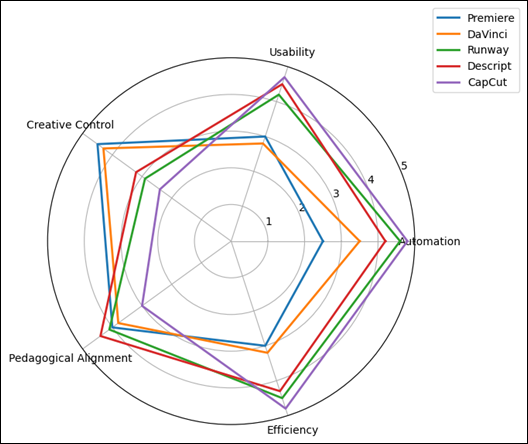
Figure 3
Radar Plot Comparing
Tool Performance Across Evaluation Dimensions (Mean Likert Scores, N=24)
Students who used Runway ML and Descript, in contrast, wrote first drafts quickly. The text-based editing in Descript allowed students to work on narrative structure instead of on timeline editing, whereas Runway ML allowed experimenting creatively by removing background with automatic background removal and visual effects. Nonetheless, there were transparency limitations as some students indicated that they could not understand the reason why some of the automated edits were made. Those students who used CapCut took the shortest time, and were very satisfied at the initial stages. Nonetheless, assessment by instructors revealed that there was a high visual consistency of the outputs because of the use of templates, and there was a minimal difference in styles.
Table 3
|
Table 3 Summary of Student Task Observations Across Tools |
|||
|
Tool |
Observed Strengths |
Observed Limitations |
Learning Impact |
|
Adobe Premiere Pro |
High creative control,
deep skill engagement |
Steep learning curve,
slower completion |
Strong conceptual
understanding |
|
DaVinci Resolve |
Professional visual
quality, color literacy |
Interface complexity |
Advanced aesthetic
awareness |
|
Runway ML |
Rapid prototyping,
creative exploration |
Opaque automation
decisions |
High ideation,
moderate skill clarity |
|
Descript |
Narrative-focused
editing, usability |
Limited fine-grain
visual control |
Strong storytelling
skills |
|
CapCut |
Speed, accessibility,
confidence boost |
Template dependence,
shallow reasoning |
High engagement, lower
skill depth |
As exhibited in the case study, the level of automation has a greater effect on learning behavior, and not efficiency of task. Notably, reflections of students showed that creative understanding was enhanced where automation facilitated and not substituted in making decisions.
Figure 4
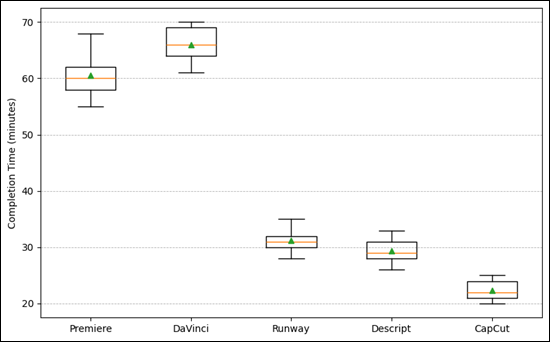
Figure 4 Distribution of Completion Time Across Tools (Minutes), Showing Variability Among Student Groups
These results supplement the quantitative results of Section 5.2 and affirm the thesis that choice of tools in teaching media must be pedagogically sequenced. First courses can be supported by tools based on AI-natives or templates to develop confidence, but intermediate and advanced courses can incorporate assistive and intelligent enhancement tools to develop critical editing skills. Even in situations where the efficiency of workflow was high, the creative control and pedagogical alignment came out as determinant factors that contributed to the quality of the learning process. This proves the inability to predict educational appropriateness based on the performance of automation solely, hence the necessity of a multi-dimensional and integrated evaluation method.
6. Comparative Analysis and Results
To complete the research, the tools representing each of the categories were tested: Adobe Premiere Pro (assistive automation), DaVinci Resolve (intelligent enhancement), Runway ML and Descript (AI-native platforms), and CapCut (template-driven tools). The assessment of all tools was made through the same datasets, tasks and scoring rubrics to compare them with each other. AI-native and template-driven tools scored the most in automation and efficiency, and were particularly more successful in auto-cutting and removing the background, but tended to decrease the student involvement in creative decision-making. Conversely, more creative control and transparency was provided by assistive and intelligent enhancement tools that facilitated more insight into the principles of editing even at higher learning curves. Beginner-oriented tools like CapCut and Descript were more usable, whereas the professional tools were favored when the skill was developed over the long term.
Table 4
|
Table 4 Comparative Scores of Automated Editing Tools (Mean Values) |
||||||
|
Tool |
Automation |
Usability |
Creative Control |
Pedagogical Alignment |
Efficiency |
Overall Score |
|
Adobe Premiere Pro |
2.5 |
3 |
4.5 |
4 |
3 |
3.4 |
|
DaVinci Resolve |
3.5 |
2.8 |
4.3 |
3.8 |
3.2 |
3.5 |
|
Runway ML |
4.6 |
4.2 |
2.9 |
4.1 |
4.5 |
4.1 |
|
Descript |
4.2 |
4.5 |
3.2 |
4.4 |
4.3 |
4.1 |
|
Cap Cut |
4.8 |
4.7 |
2.4 |
3 |
4.8 |
4 |
The outcomes of the comparative analysis reveal that there is no tool that fits all teaching and technical requirements. In lieu, all groups of automated editing tools have different pedagogical applications. Professional assistive tools are highly creative controlled and transferable in skills and hence can be applied in advanced courses in media. AI-native platforms are more nuanced strikes between automation and creativity and promote exploration and concept-based learning. Tools based on templates are as accessible and efficient as possible, but need to be carefully framed in the instructional approach to prevent superficial learning.
Figure 5

Figure 5 Observation Rubric Scores Across Learning-Impact Constructs (mean, 1–5)
The results indicate that blended-tool approach might be the most promising in media-education whereby, students would be introduced to various editing paradigms at various levels of learning. When educators choose the tools according to the objectives of the course and the level of proficiency in students, automation can be used to promote creativity without undermining the base of skills.
7. Conclusion
This research paper reviewed automated editing tools to media students based on a comparative, education-based paradigm, which combines technical performance with the pedagogical relevance. The analysis developed three categories of tools, namely, assistive, intelligent enhancement, AI-native and template-driven, and proved that educational effectiveness is not solely based on automation. Although extremely automated tools made it more efficient and more accessible, they tended to decrease the transparency of creativity and ability to articulate skills. By contrast, professional assistive aid helped to learn underlying concepts and creative control, but at a greater cognitive and time cost. The observations made in case-studies ensured that learning outcomes are enhanced when automation aids student decision-making as opposed to substituting it. The results support the significance of the relevance of the tools chosen to the course goals and the learner level. On the whole, automated editing tools have a great potential to improve the process of media education when incorporated with a blended, stage-appropriate pedagogical approach that will balance the efficiency, creativity, and development of the skills.
8. Limitations and Future Work
Although this study has aided, it has some limitations. To begin with, the sample size used in the case study was relatively small and the study was done in one academic setting and this may not represent the generalizability of the results to various other institutions and learner profiles. Second, the assessment was based more on the performance of short-term tasks and observation rubrics; no assessment was done on long-term learning outcomes, skill retention, and creative transferability. Third, the research was done on a selected list of popular automated editing tools, and new platforms or proprietary AI systems were not covered. Also, the conceptual but not empirically quantified ethical aspects were algorithmic bias, attribution of authorship, and data privacy.
These limitations can be overcome in the future by carrying out longitudinal studies with many institutions, larger and more heterogeneous samples of students, and adding objective learning metrics like revision depth, skill transfer also creative originality. Additional work can also expand the system of assessment to encompass ethical disclosure, explainable AI markers, and evaluation fairness, enhancing the practices related to the responsible use of AI-aided editing tools in the field of media education.
CONFLICT OF INTERESTS
None.
ACKNOWLEDGMENTS
None.
REFERENCES
Alier, M., Camba, J., and García‑Peñalvo, F. (2024). Generative Artificial Intelligence in Education: From Deceptive to Disruptive. International Journal of Interactive Multimedia and Artificial Intelligence, 5(1), 5-14. https://doi.org/10.9781/ijimai.2024.02.011
Almassaad, A., Alajlan, H., and Alebaikan, R. (2024). Student Perceptions of Generative Artificial Intelligence: Investigating Utilization, Benefits, and Challenges in Higher Education. Systems, 12(10), 385. https://doi.org/10.3390/systems12100385
Almulla, M. A. (2023). Constructivism Learning Theory: A Paradigm for Students' Critical Thinking, Creativity, and Problem Solving to Affect Academic Performance in Higher Education. Cogent Education, 10(1), 2172929. https://doi.org/10.1080/2331186X.2023.2172929
Al‑Zahrani, A. M. (2024). Unveiling the Shadows: Beyond the Hype of AI in Education. Heliyon, 10, e30696. https://doi.org/10.1016/j.heliyon.2024.e30696
Brako, D. K., and Mensah, A. K. (2023). Robots Over Humans? The Place of Artificial Intelligence in the Pedagogy of Art Direction in Film Education. Emerging Technologies, 3(1), 51-59. https://doi.org/10.57040/jet.v3i2.484
Bulut, O., Cutumisu, M., and Yilmaz, M. (2024). Ethical Challenges in AI‑Based Educational Measurement (arXiv:2406.18900). arXiv. https://arxiv.org/abs/2406.18900
Chaudhry, A., Wolf, J., and Gervasio, M. (2022). A Transparency Index for AI in Education (arXiv:2206.03220). arXiv. https://arxiv.org/abs/2206.03220
Chinta, R., Qazi, M., and Raza, M. (2024). FairAIED: A Review of Fairness, Accountability, and Bias in Educational AI systems (arXiv:2407.18745). arXiv. https://arxiv.org/abs/2407.18745
Deng, R., Yang, Y., and Shen, S. (2024). Impact of Question Presence and Interactivity in Instructional Videos on Student Learning. Education and Information Technologies, 1-29.
Desai, T. S., and Kulkarni, D. C. (2022). Assessment of Interactive Video to Enhance Learning Experience: A Case Study. Journal of Engineering Education Transformations, 35(1), 74-80. https://doi.org/10.16920/jeet/2022/v35is1/22011
Gouseti, A., James, F., Fallin, L., and Burden, K. (2024). The Ethics of Using AI in K-12 Education: A Systematic Literature Review. Technology, Pedagogy and Education, 34(2), 161-182. https://doi.org/10.1080/1475939X.2024.2428601
Licht, F. (2024). Generative Artificial Intelligence in Higher Education: Why the "Banning Approach" to Student use is Sometimes Morally Justified. Philosophy & Technology, 37(1), 113. https://doi.org/10.1007/s13347-024-00799-9
Luan, H., et al. (2020). Challenges and Future Directions of Big Data and Artificial Intelligence in Education. Frontiers in Psychology, 11, 580820. https://doi.org/10.3389/fpsyg.2020.580820
Matsiola, M., Spiliopoulos, P., and Tsigilis, N. (2022). Digital Storytelling in Sports Narrations: Employing Audiovisual tools in Sport Journalism Higher Education Course. Education Sciences, 12(1), 51. https://doi.org/10.3390/educsci12010051
Munro, R. (2023). Co‑Creating Film Education: Moments of Divergence and Convergence on Queen Margaret University's Introduction to Film Education Course. Film Education Journal, 6(1), 32-46. https://doi.org/10.14324/FEJ.06.1.04
O'Connor. (2022). Constructivism, Curriculum and the Knowledge Question: Tensions and Challenges for Higher Education. Studies in Higher Education, 47(2), 412-422. https://doi.org/10.1080/03075079.2020.1750585
Pawlaszczyk, D., Engler, P., Bodach, R., Michel, M., and Zimmermann, R. (2025). Automated Data Population for Ios Devices with Autopodmobile. Journal of Digital Security and Forensics, 2(1), 58–66. https://doi.org/10.29121/digisecforensics.v2.i1.2025.46
Susanti, A., Suyatna, A., and Herlina, K. (2023). Development of H5P Moodle‑Based Interactive STEM‑loaded Videos to Grow Performance Skills as an Effort to Overcome Learning Loss in Electrical Measuring Materials. Jurnal Penelitian Pendidikan IPA, 9(4), 6974-6984. https://doi.org/10.29303/jppipa.v9i9.3546
Tiernan, P., Costello, E., Donlon, E., Parysz, M., and Scriney, M. (2023). Information and Media Literacy in the Age of AI: Options for the future. Education Sciences, 13(9), 906. https://doi.org/10.3390/educsci13090906
Williamson, B., Eynon, R., and Potter, J. (2020). Pandemic Politics, Pedagogies and Practices: Digital Technologies and Distance Education During the Coronavirus Emergency. Learning, Media and Technology, 45(2), 107-114. https://doi.org/10.1080/17439884.2020.1761641
Zhai. (2024). AI‑Generated Content and its Impact on Student Learning and Critical Thinking: A Pedagogical Reflection. Smart Learning Environments, 11(1), 12.
|
|
 This work is licensed under a: Creative Commons Attribution 4.0 International License
© ShodhKosh 2026. All Rights Reserved.